Audio Converter for Android
Convert MP3 or WAV audio to MP3 at 128 to 320 kbps, and trim, merge, fade, reverse, loop or compress files already on your phone. Free, no ads.
- Converts MP3 or WAV input to MP3 at 128, 192, 256 or 320 kbps
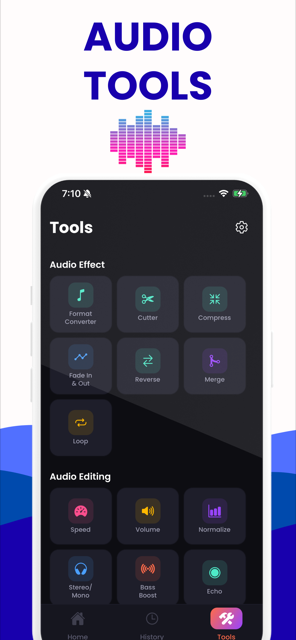
- Thirteen editing tools: cut, merge, fade, reverse, loop, speed, volume, normalise, mono, bass, echo, compress
- Records audio in the app, then edits what you just recorded
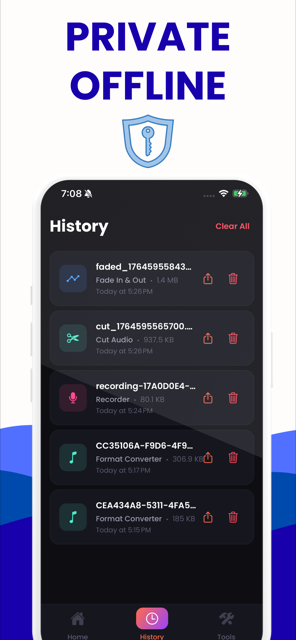
- History keeps every finished file so you can share it again
- Everything runs on the device — no upload, no account, works offline
- No ads
What the Android app does
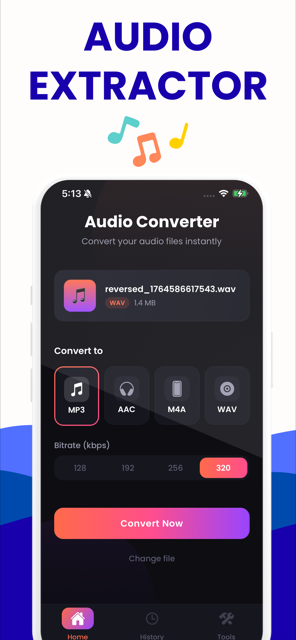
Two jobs. The first is verified format conversion: pick an MP3 or WAV file, choose a bitrate between 128 and 320 kbps, and the app writes an MP3 on the device. The second is editing, through thirteen tools that each do one thing to a recording you already have.
| Tool | What it does |
|---|---|
| Format converter | MP3 or WAV input to MP3 at 128–320 kbps |
| Cutter | Trims a recording to the part that matters |
| Compress | Reduces the file size |
| Merge | Joins two files end to end |
| Fade in & out | Ramps the start and end |
| Reverse | Plays it backwards |
| Loop | Repeats a clip |
| Speed | 0.5× to 2× |
| Volume & normalize | Raises the level, or brings the loudest peak to full scale |
| Stereo to mono | Halves the size of a spoken recording |
| Bass boost & echo | Lifts the low end; adds a repeating tail |
| Recorder & player | Records new audio and previews before sharing |
The bitrate ladder is the same one this website offers, so an MP3 converted in the app and one converted in the browser at the same setting are asking the same thing of the encoder.
Android app or this website?
The website reads far more formats and writes ten instead of one, including M4A, AAC, FLAC, ALAC, OGG, AIFF and iPhone ringtones — and where the audio is already in the right codec it copies it across without re-encoding, which the app never does. The app wins for MP3 or WAV files already on the phone, especially when you have no signal.
| If you want to… | Use | Why |
|---|---|---|
| Convert an MP3 or WAV recording on your phone | The app | No syncing, and it works with no signal |
| Record and then edit | The app | The website has no recorder |
| Convert M4A, AAC, FLAC, ALAC, OGG, AIFF or WMA | This website | Android 1.0 accepts MP3 and WAV and writes MP3 only |
| Convert without losing anything at all | This website | It copies the audio across untouched when the codec already suits the container |
| Pull the soundtrack out of a video | This website | The app's picker takes audio files only |
Where your audio goes
Nowhere. Conversion happens on the device using Android's own media stack. There is no upload, no account and no cloud folder — which is also why it keeps working in aeroplane mode.
Getting started
- Install the app and open it.
- On the Home tab, choose an MP3 or WAV file and a bitrate.
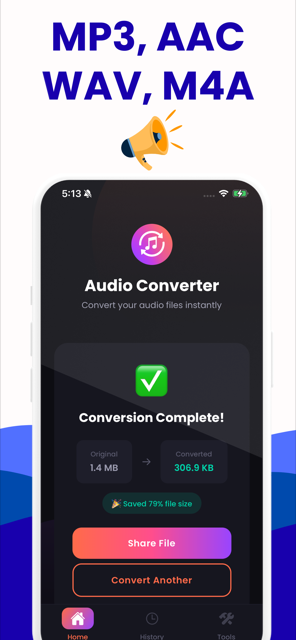
- Tap Convert Now. The result screen shows the real before and after size.
- Share it, or find it again later under History.
- For anything other than a format change, the Tools tab has the other twelve.
What the app looks like
These are the real screens, not mock-ups.
About the app
Is the Android app free?
Yes, free to download with no ads. Billing is disabled in the Android build, so there is no subscription prompt and no in-app purchase to decline.
Which formats can it convert to?
Android 1.0 accepts MP3 and WAV input and writes MP3 at 128, 192, 256 or 320 kbps. For M4A, AAC, FLAC, ALAC, OGG, AIFF, WMA or an iPhone ringtone, use the converter on this website.
Does it work offline?
Yes. Everything runs on the device, so conversion and every editing tool work in aeroplane mode. Nothing is uploaded at any point, which is also why there is no account to create.
Can it convert a WhatsApp voice note?
WhatsApp voice notes are Opus in an OGG container, which Android 1.0 of the app does not accept. Use this website to convert the saved note to MP3 first; it shows exactly what codec the file contains before you commit.